
Download Tip and Split Calculator – tip calculator, split bill, Android app, free, easy to use, mobile tool, calculate tip, bill splitter, restaurant tip, quick calculation
Overview
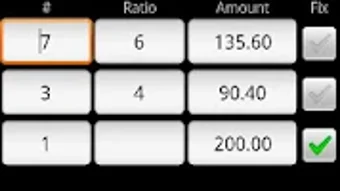
Tip and Split Calculator is a dedicated mobile utility designed to simplify the process of calculating tips and dividing bills among groups. The app is tailored for users who frequently dine out, host gatherings, or manage shared expenses and need accurate, real-time calculations without manual effort. It enables quick tip estimation based on percentage or fixed amounts and supports flexible bill splitting, whether by equal shares, custom ratios, or fixed contributions per person.
The tool is especially useful in social or professional settings where financial transparency and efficiency are valued. Developed by higaki_k, the app focuses on usability and speed, targeting everyday consumers and casual users rather than enterprise or professional financial teams. Its lightweight design and straightforward interface make it suitable for both tech-savvy individuals and those less familiar with digital tools.
The app does not require an internet connection to function, making it reliable in environments with limited connectivity. Real-world use cases include splitting restaurant checks, managing group purchases, or determining gratuities at events. The developer did not provide additional details about the app’s development history or broader product ecosystem.
Key Features & Capabilities
- Tip Calculation – Users can calculate tips based on a percentage of the total bill or a fixed dollar amount, supporting common gratuity rates used in restaurants and service industries.
- Flexible Bill Splitting – The app allows splitting charges by equal shares, custom ratios, or fixed amounts per person, accommodating uneven contributions or special arrangements.
- Keypad Input System – A built-in virtual keypad enables users to enter values directly, with a long press on the target entry to activate or modify inputs, improving accessibility and speed.
- Help Section with Visual Aids – A dedicated guide provides step-by-step instructions and reference screenshots to assist new users in understanding the app’s functionality.
- Offline Functionality – All calculations are performed locally on the device, ensuring privacy and uninterrupted use without requiring an internet connection.
These features support practical scenarios such as dividing a $120 restaurant bill among four people, where one individual wants to pay a higher share due to a larger meal. The app also allows for quick adjustments when a tip percentage changes or a person opts out of contributing. The interface is designed to minimize input errors, and the ability to set fixed charges makes it ideal for managing group expenses with varying participant contributions.
User Interface, Workflow & Performance
The app features a clean, minimalistic interface focused on clarity and ease of navigation. Core functions are accessible through clearly labeled buttons and input fields, with a logical flow from entering the total bill to selecting the split method and viewing results. The layout prioritizes essential actions, reducing the number of steps needed to complete a calculation.
Navigation is intuitive, relying on standard touch gestures and visual cues. Users can quickly switch between tip calculation and bill splitting modes without confusion. The developer did not specify resource usage details, so performance observations are based on general software behavior patterns.
The app is expected to operate smoothly on modern Android devices due to its lightweight size of 4.5 MB. Stability during repeated use has not been publicly documented, but the inclusion of bug fixes in recent updates suggests ongoing maintenance. No reports of crashes or memory leaks were provided.
The app appears optimized for responsiveness, with immediate feedback on input changes, though exact CPU or RAM behavior remains unspecified.
Compatibility & System Requirements
Tip and Split Calculator is designed for Android devices, with support confirmed for the Android operating system. The current version is 1.5, and the installation size is 4.5 MB. The developer did not specify exact system requirements, such as minimum Android version, processor speed, or available storage beyond the file size.
Compatibility information was partially provided, and users are advised to ensure their device meets general Android compatibility standards. No information was given about support for tablets, wearables, or other form factors. The app does not require additional software or runtime environments to function, as it operates as a standalone package.
The developer did not disclose whether the app supports older or newer Android versions beyond the version number provided.
Pros and Cons
Pros
- Free to download and use with no in-app purchases or ads mentioned.
- Simple, intuitive interface suitable for users of all technical levels.
- Supports multiple split methods including ratio and fixed amounts.
- Offline operation ensures privacy and consistent performance.
- Includes a help section with screenshots for onboarding assistance.
Cons
- Exact system requirements were not listed, limiting compatibility clarity.
- Limited to Android platform; no information on iOS or other operating systems.
- Developer background and company details are not publicly available.
- No mention of cloud sync, backup, or cross-device access.
- Performance under heavy or repeated use was not documented.
FAQ Section
Is Tip and Split Calculator available for iOS devices?
The app is currently confirmed for Android only. No information was provided about availability on iOS or other platforms.
Does the app require an internet connection?
No, the app functions entirely offline. All calculations are processed locally on the device, ensuring no data is transmitted or stored externally.
Are there any in-app purchases or advertisements?
The app is listed as free, and no ads or in-app purchases were mentioned in the provided details. However, the developer did not confirm the absence of future monetization.
How often are updates released?
Recent updates have included bug fixes and improvements to the settings and keypad functionality. The frequency of updates is not specified.
Can I use the app to calculate tips for large groups?
Yes, the app supports splitting bills among multiple users, with options for equal shares, custom ratios, or fixed contributions. The interface is designed to handle group calculations efficiently.
Final Thoughts + CTA
Tip and Split Calculator delivers a focused, reliable solution for everyday users needing quick and accurate tip and bill-splitting tools. Its clean design, offline functionality, and support for flexible splitting methods make it a practical choice for social and dining scenarios. While the app lacks detailed system requirements and cross-platform availability, its core functionality is well-executed and accessible.
The inclusion of a help section and the absence of ads or paywalls enhance the user experience. For individuals seeking a simple, secure, and fast way to manage shared expenses on Android, this app stands out as a dependable tool. Download Tip and Split Calculator now.







